MODGENICS | LEARN. GROW. INNOVATE.

Learn by Doing. Think Like an AI Engineer.

Build practical AI systems with guided projects, structured lessons, and live support from instructors and peers.

Initiative by Modgenics

Start Enrollment

Choose your course

Pick the course that fits your goals.

Is this course for you?

If you want to start learning AI from scratch, If you want to become the go-to AI automator for any project,

this is for you!

If you've learned some concepts but still feel confused, If you know frontend and backend pieces but can't ship end-to-end,

this is for you!

If you want to build a few neural
network models and agents quickly,
If you want to ship full-stack features faster
with AI-assisted coding and repeatable workflows,

this is for you!

If you are tired of learning
AI alone,
If you are tired of boilerplate
and manual, repetitive work,

this is for you!

Course Outline (Project-Based Learning)

Project 1

Build an LLM Playground

LLM Overview and Foundations

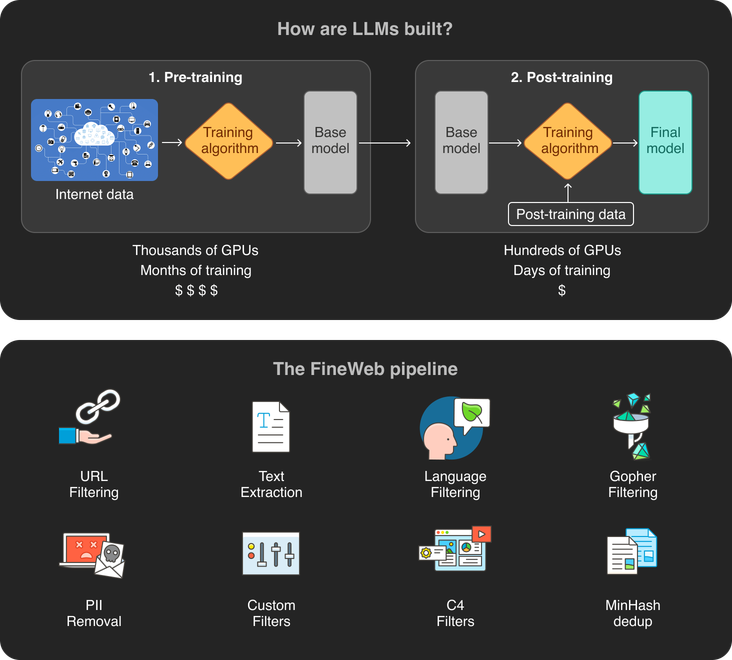
Pre-Training
  • Data collection (manual crawling, Common Crawl)
  • Data cleaning (RefinedWeb, Dolma, FineWeb)
  • Tokenization (e.g., BPE)
  • Architecture (neural networks, Transformers, GPT family, Llama family)
  • Text generation (greedy and beam search, top-k, top-p)
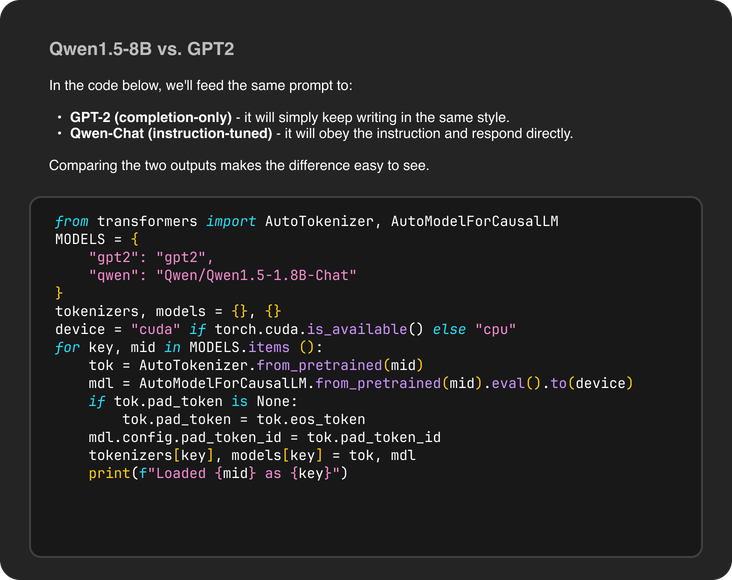
Post-Training
  • SFT
  • RL and RLHF (verifiable tasks, reward models, PPO, etc.)
Evaluation
  • Traditional metrics
  • Task-specific benchmarks
  • Human evaluation and leaderboards
Chatbots' Overall Design
Project 1 illustration
Project 2

Build a Customer Support Chatbot using RAGs and Prompt Engineering

Overview of Adaptation Techniques

Finetuning
  • Parameter-efficient fine-tuning (PEFT)
  • Adapters and LoRA
Prompt Engineering
  • Few-shot and zero-shot prompting
  • Chain-of-thought prompting
  • Role-specific and user-context prompting

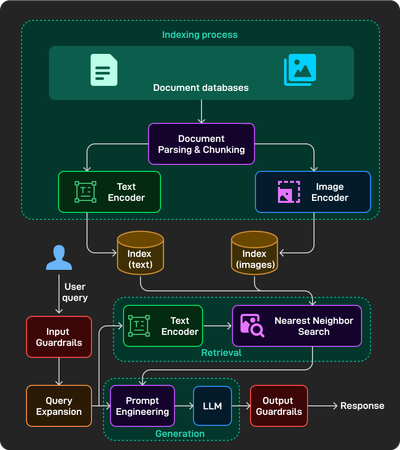
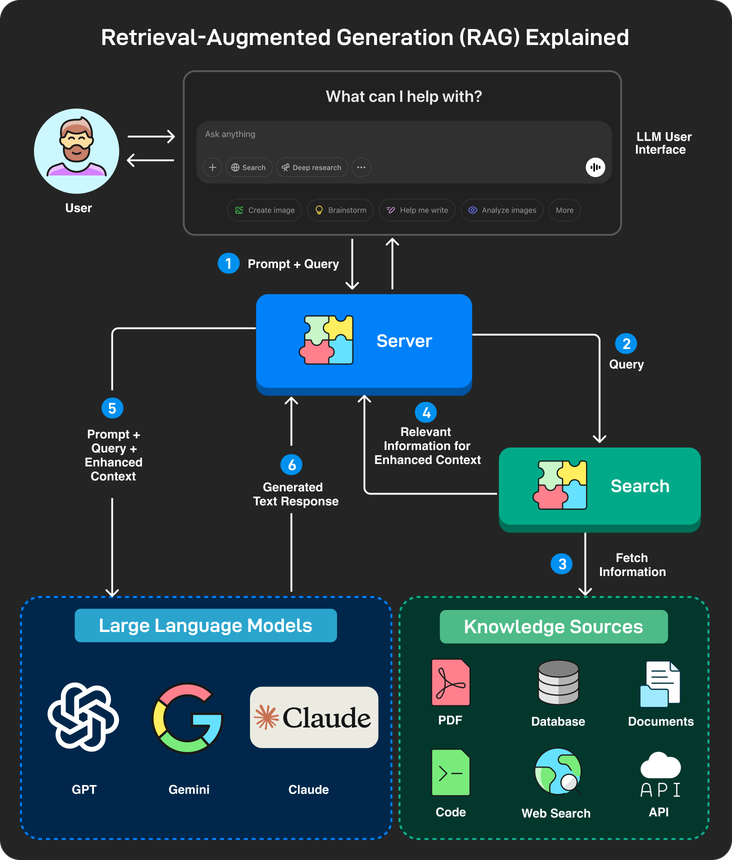
RAGs Overview

Retrieval
  • Document parsing (rule-based, AI-based) and chunking strategies
  • Indexing (keyword, full-text, knowledge-based, vector-based, embedding models)
Generation
  • Search methods (exact and approximate nearest neighbor)
  • Prompt engineering for RAGs

RAFT: Training technique for RAGs

Evaluation (context relevance, faithfulness, answer correctness)

RAGs' Overall Design
Project 2 illustration
Project 3

Build an "Ask-the-Web" Agent similar to Perplexity with Tool calling

Agents Overview
  • Agents vs. agentic systems vs. LLMs
  • Agency levels (e.g., workflows, multi-step agents)
Workflows
  • Prompt chaining
  • Routing
  • Parallelization (sectioning, voting)
  • Reflection
  • Orchestration-worker
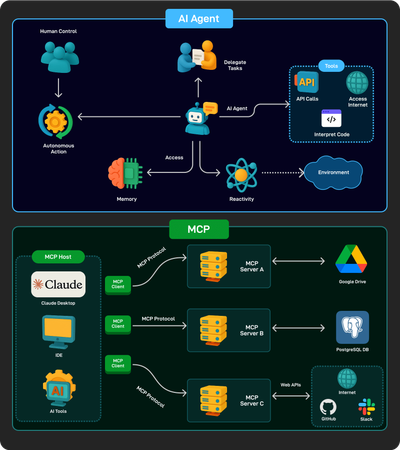
Tools
  • Tool calling
  • Tool formatting
  • Tool execution
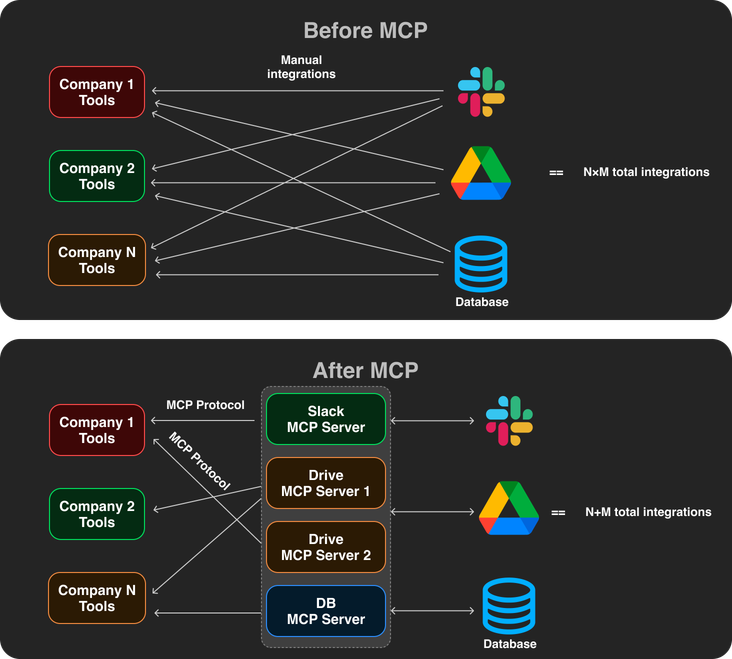
  • MCP
Multi-Step Agents
  • Planning autonomy
  • ReACT
  • Reflexion, ReWOO, etc.
  • Tree search for agents

Multi-Agent Systems (challenges, use-cases, A2A protocol)

Evaluation of agents
Project 3 illustration
Project 4

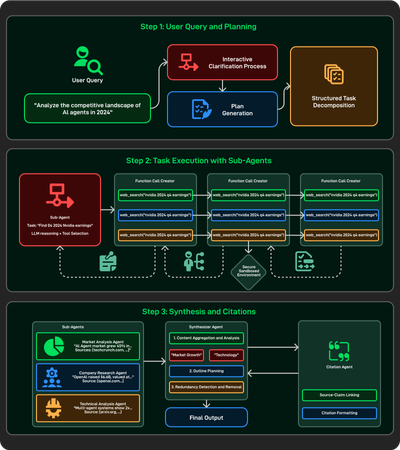
Build "Deep Research" Capability with Web Search and Reasoning Models

Reasoning and Thinking LLMs
  • Overview of reasoning models like OpenAI's "o" family and DeepSeek-R1
Inference-time Techniques
  • Inferece-time scaling
  • CoT prompting
  • Self-consistency
  • Sequential revision
  • Tree of Thoughts (ToT)
  • Search against a verifier
Training-time techniques
  • SFT on reasoning data (e.g., STaR)
  • Reinforcement learning with a verifier
  • Reward modeling (ORM, PRM)
  • Self-refinement
  • Internalizing search (e.g., Meta-CoT)
Project 4 illustration
Project 5

Build a Multi-modal Generation Agent

Overview of Image and Video Generation
  • VAE
  • GANs
  • Auto-regressive models
  • Diffusion models
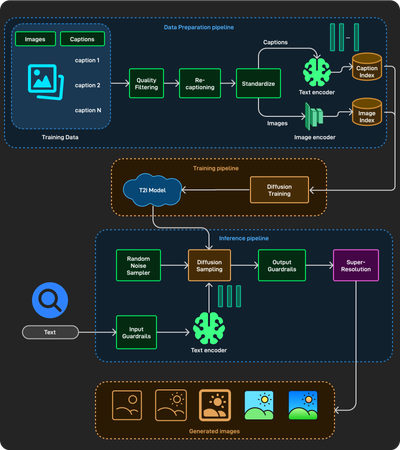
Text-to-Image (T2I)
  • Data preparation
  • Diffusion architectures (U-Net, DiT)
  • Diffusion training (forward process, backward process)
  • Diffusion sampling
  • Evaluation (image quality, diversity, image-text alignment, IS, FID, and CLIP score)
Text-to-Video (T2V)
  • Latent-diffusion modeling (LDM) and compression networks
  • Data preparation (filtering, standardization, video latent caching)
  • DiT architecture for videos
  • Large-scale training challenges
  • T2V's overall system
Project 5 illustration
Project 6

Capstone Project

  • Choose your own idea
  • Build with techniques from the course
  • Get real-time feedback from the instructor as you build
  • Demo + feedback session
Project 6 illustration

Course Highlights

Structured, Systematic Learning Path Full-Stack Path from UI to Production

Structured learning path highlight

Intuitive, Visual Explanations UI Systems, Layout & Product Polish

Visual explanations highlight

Project-Based Learning that Sticks Ship Features Faster with AI Pair-Programming

Project-based learning highlight

Beginner-Friendly Code that You can Run Automation, Scripts & Pipelines You Actually Use

Runnable code highlight

Learn the ’Why’ Behind the ’How’ Architecture, Trade-offs & Responsible AI Augmentation

Conceptual depth highlight

FAQs

What are the prerequisites?

Basic computer science knowledge and basic Python are required to complete the projects but not needed to follow the lectures and live sessions.

What’s the time commitment? Can I take this course while working full-time?

4–6 hours per week. About 4–5 hours of lectures and project walkthroughs, plus 1 optional hour for coding practice or assignments. If you’re new to AI or Python, or want to explore extra project settings, it may take longer.

What is the course fee?

AI Engineering: ₹2,04,999 plus applicable taxes. AI-Augmented Full-Stack & Automation: ₹1,95,999 plus applicable taxes.

Got questions?

Reach out through the enrollment interest form. We typically get back within 24 hours.

Trusted by learners from

Adobe Google Stanford